

Google Unveils New Tools for Personal Information Management
Google has launched updates to several of its tools, including the «Manage Your Information Results» feature and the ability to remove unwanted images from its search engine.
This has been reported by The Tech crunch.
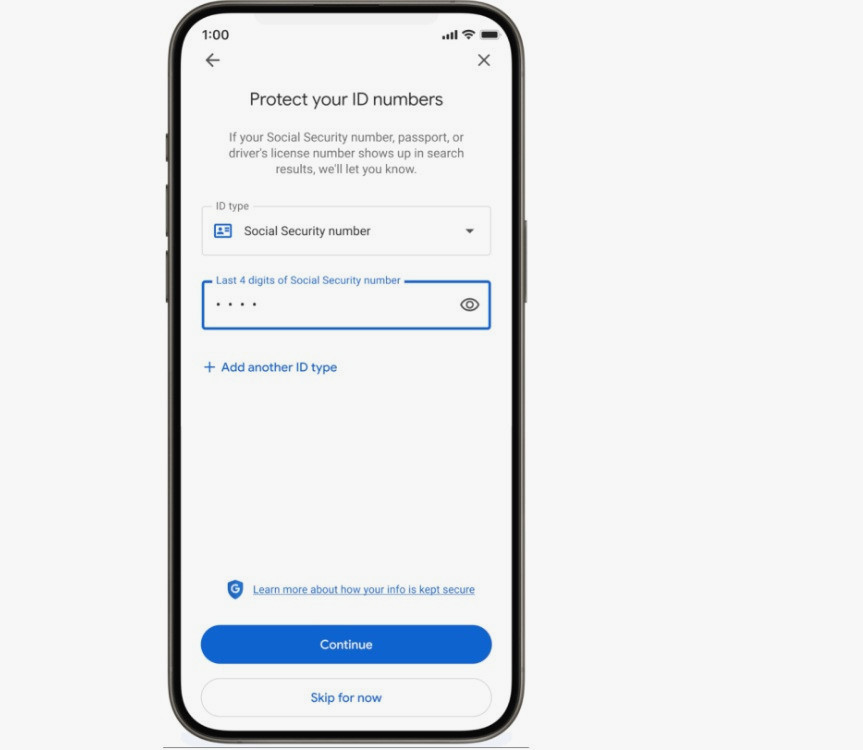
The «Manage Your Information Results» tool allows users to remove search results containing their personal information, such as phone numbers, email addresses, or home addresses. It can now also be used to request the removal of results that include sensitive information like driver’s license numbers, passport numbers, or social security numbers, the company stated.
Users can access the tool through the Google app by clicking on their Google account photo and selecting «Manage Your Information Results». If this is the user's first time using the tool, they need to click «Get Started» and then add the personal contact information they wish to track. They will then be prompted to input their government ID numbers. Existing users can add their ID numbers and select which ones they want to monitor.
Once the data is confirmed, Google will automatically monitor search results and notify the user if it finds results containing the specified information. Google notes that removing this information from search results does not completely erase it from the internet, but it can help protect your privacy.
The update will initially be rolled out in the United States in the coming days, with plans to implement it in other regions later.
Google also announced that it has simplified the process for submitting removal requests for unwanted explicit images from its search engine. Users now only need to click on the three dots next to the image, select «Remove Result», and then confirm that «This image is sexual in nature». Additionally, there’s no longer a need to report images one by one, as multiple images can now be selected and reported at once. Users can also track the status of all their requests in the «Manage Your Information Results» section.